Minsky IPE
On-prem intelligence production connecting requirements, evidence, AI analysis, and review.
Solutions
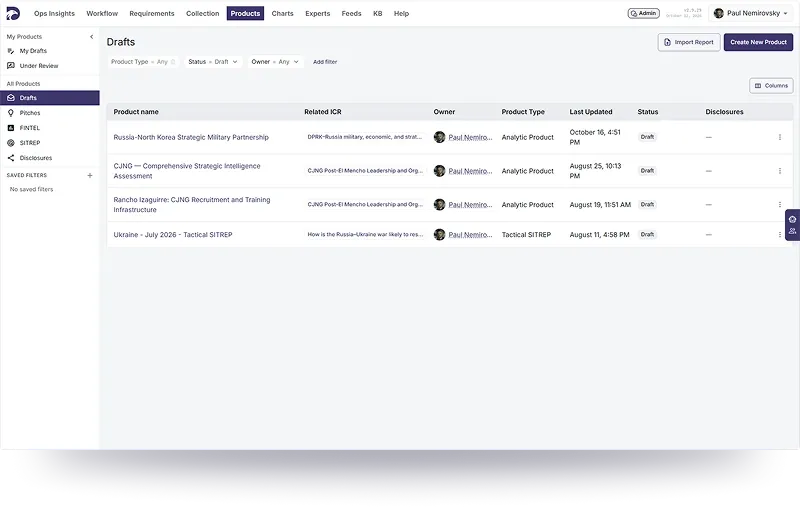
Web application
Central workspace for intelligence production, evidence management, and review.
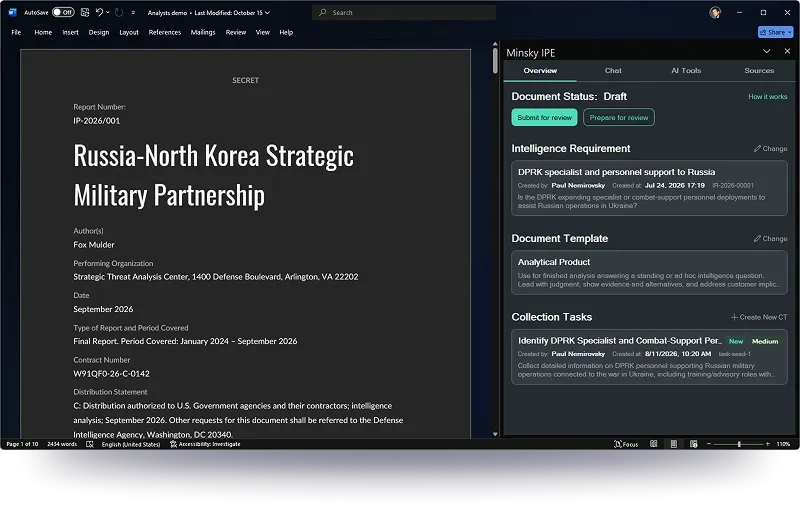
MS Word add-in
AI-assisted intelligence workflows directly inside Microsoft Word.
- Timeline
- 2025–2026
- Team
- Me + 2 Engineers
- Project Type
- SaaS
- Tools
 Cursor
 Figma
Client

The Department of War already produced intelligence, but across separate teams and tools. It needed that work connected, not replaced.

Users
One record had to serve executives, analysts, and collectors. Each group came in with different incentives and different risk.
Executives


Intelligence


Information


Disclosure Office

Problems
Working in Silos
Teams worked the same problem in separate tools, so context died at every handoff.


Air-gapped
Nothing could depend on the cloud. Assistance had to run where the evidence already lived.
No Cloud
Models, evidence, and generated output stay inside the customer’s network.
No New Apps
A replacement editor would mean another system to learn and another copy of the report.


Solutions
Shared environment
We framed one Intelligence Production Environment that kept roles distinct but evidence shared.
Minsky IPE
AI Tools Enabled
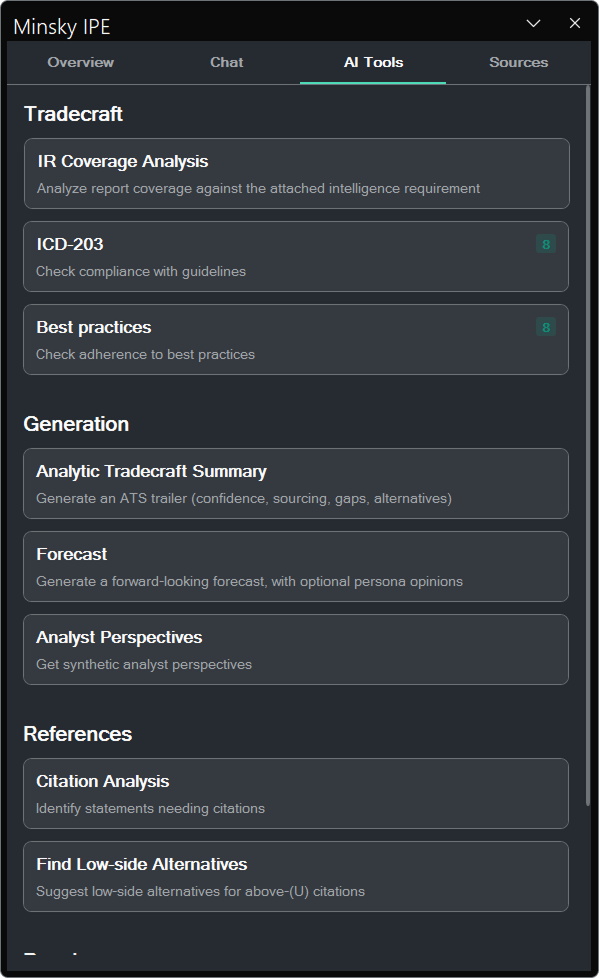
Tradecraft, generation, references, and reach are assistive tools under human control. They are not a black box.
Tradecraft
Coverage and ICD 203 checks flag weak spots. They do not rewrite the draft.
Generation
Edits come back as proposals the analyst can accept, reject, or retry.
References
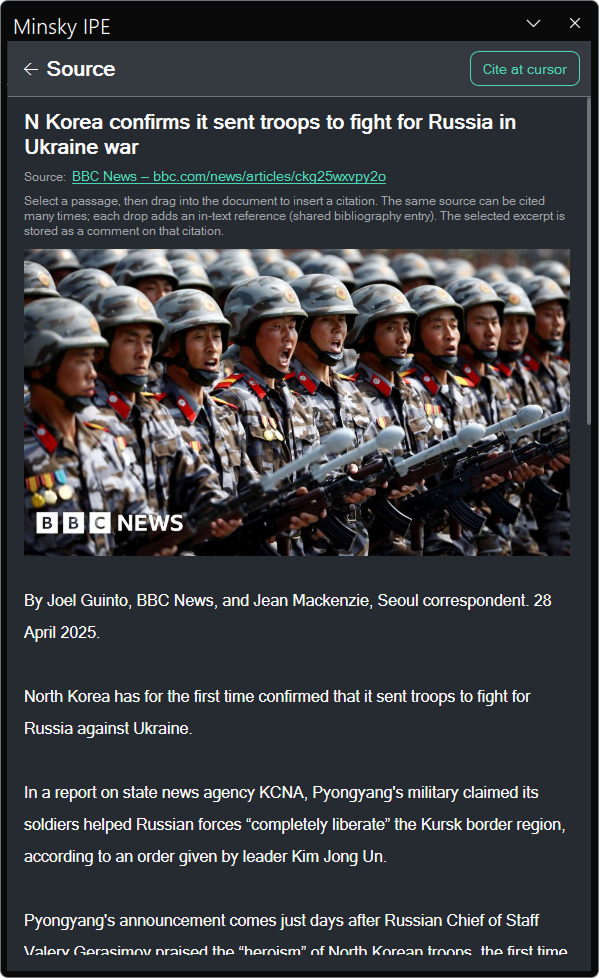
The analyst picks the supporting passage and cites it at the cursor.
Reach
Post-processing extracts entities, tags, and events, so the report and the analyst’s profile can be found.
Native Integration
Word became the front door: draft, cite, and verify without leaving the report.
My role
On a three-person team, I framed the platform around a shared report record and set the interaction direction across collection, analysis, and review. I partnered with two engineers to turn that model into an on-premises system, then proposed, designed, and implemented its Word LTSC 2024 add-in.
Platform direction
- I translated doctrine and stakeholder knowledge into a product model connecting requirements, collection tasks, evidence, drafts, and approval.
- I chose the report as the system’s organizing record, rather than an AI chat, so each workflow had a shared source of context.
Team collaboration
- I partnered with two engineers to test the product model against platform, security, and Office integration constraints.
- Together, we ruled out cloud dependencies and a replacement editor; I led the resulting experience and interaction decisions.
Word add-in ownership
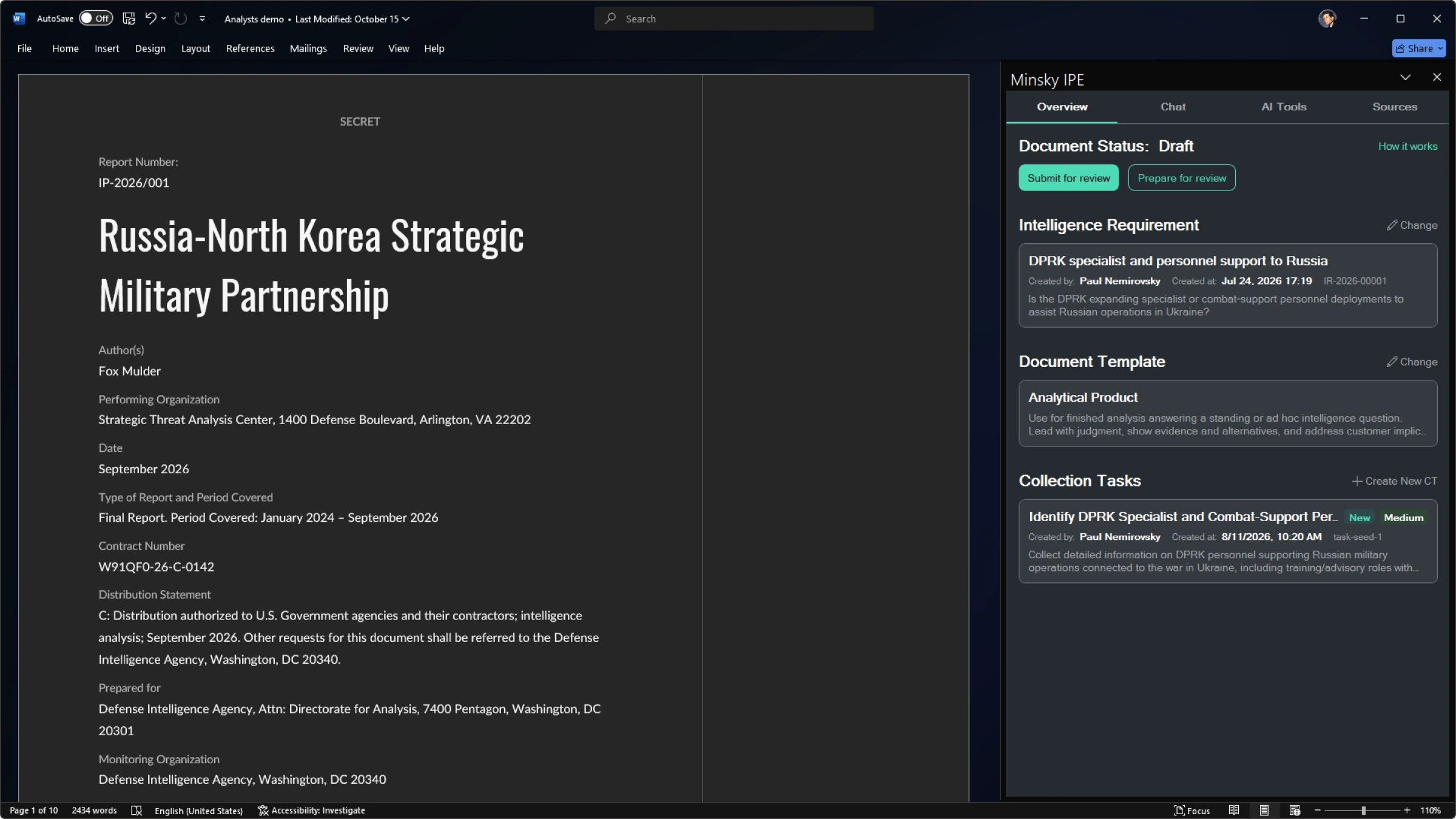
- I proposed the integration, designed the task pane, and implemented it for Word LTSC 2024.
- I carried the add-in through review against the on-premises and security constraints.
Solution overview
Connected the intelligence production environment to Word, where analysts already drafted and reviewed reports.
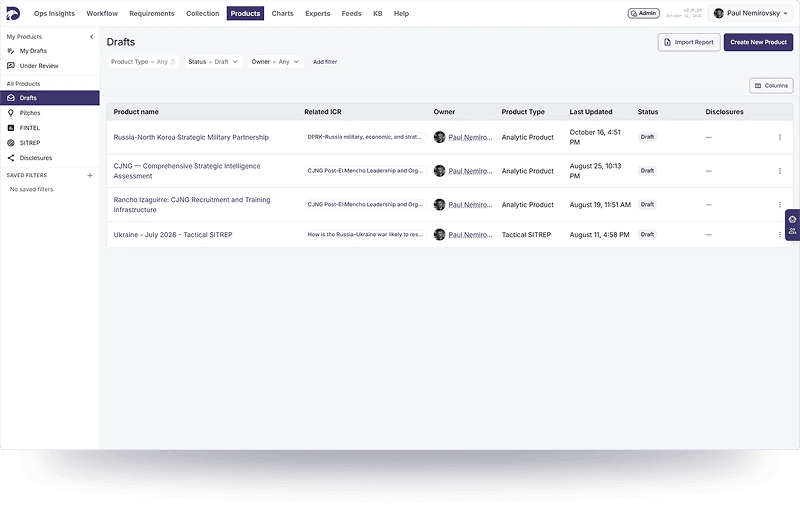
IPE Platform
- Connects intelligence production and information collection silos.
- Enables AI assistance with human oversight in the production loop.
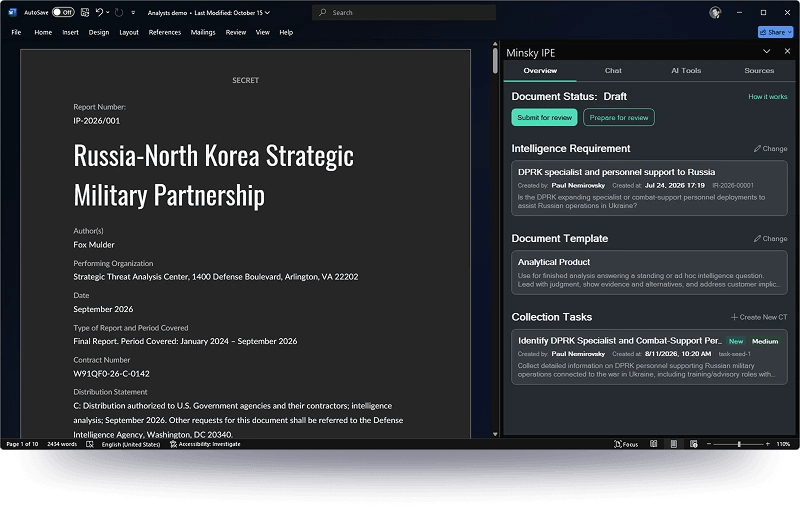
Word add-in
- Connects IPE into the document where the report is written.
- Integrates AI assistance through native apps analysts already use.
Problem and constraints
The requirement, source package, draft, and approval trail could live in different systems even though every decision depended on the others. Three constraints shaped the product direction.
No cloud dependency
Analysts worked on an air-gapped network. A cloud assistant could not reach the environment where the work was allowed to happen.
Run the assistant where the evidence lives
We designed an on-premises environment so models, evidence, and generated output could remain inside the customer’s network.
The report already had a home
A replacement editor would add another system to learn and another copy to synchronize with the official report.
Enter through Word
I proposed, designed, and implemented a Word LTSC 2024 add-in so analysts could use the platform without moving their official document.
Handoffs lost context
An uncovered requirement, a collection task, a source, and a reviewer’s decision could sit in separate tools even though each depended on the others.
Make the evidence trail the product
Collection, analysis, validation, and publication could share one report record. Assistance would start from that record and return proposals to it.
Research under access constraints
Because direct analyst interviews were restricted, I treated the workflow model as a hypothesis to test. It did not replace field research.
Reconstruct
- I mapped the workflow from joint doctrine, analytic standards, intelligence-community dictionaries, and public accounts of analyst–policymaker tension.
Validate
- A stakeholder with experience speaking to collectors, briefers, analysts, policymakers, and senior executives checked the model against work inside the closed channel.
Bound the claim
- This established a defensible product frame, but it did not replace usability testing with the analysts who would perform the work.
Users
The same record had to serve people with different incentives: analysts defend the reasoning, collectors close the gaps, briefers preserve the nuance, policymakers need an answer, and leadership needs evidence of rigor.
Gains
Pains
- Produce faster without losing rigor.
- Pull evidence and citations into the product.
- Ensure attribution and traceability.
- Get structured feedback sooner.
- Tailor products to policymaker readbooks.
- Build trust with transparent, accurate work.
- Blamed for under-warning and for over-warning.
- Split across Word, email, and drives.
- Policymakers mistrust the reasoning.
- Credit for the insight gets lost.
- Hard to match a product to a decision.
- The policymaker’s need shifts unseen.
Models and flows
Before the Word surface existed, I used these models and flows to align the product with doctrine, evidence handling, and on-prem assistance. They are working diagrams, not marketing visuals.
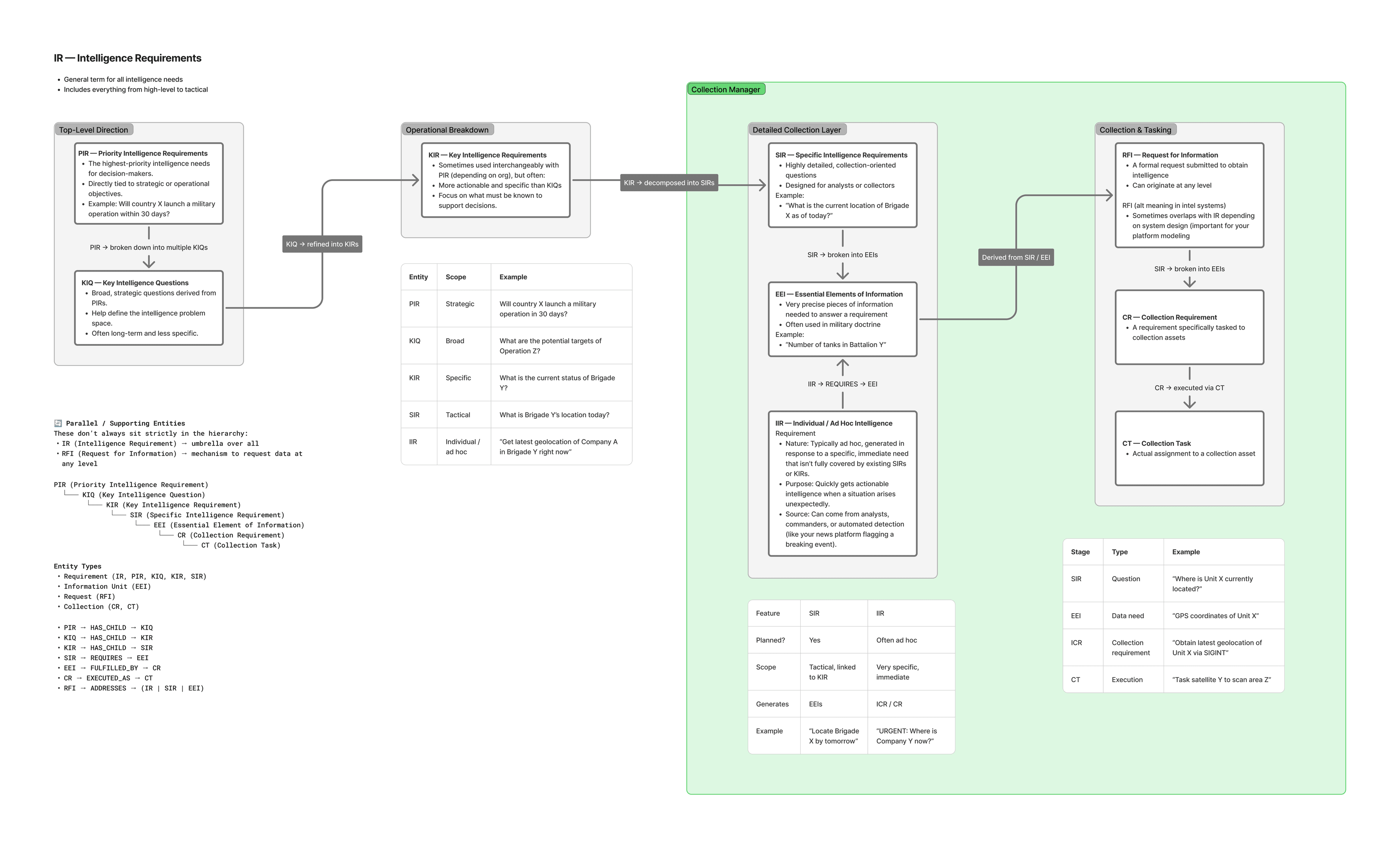
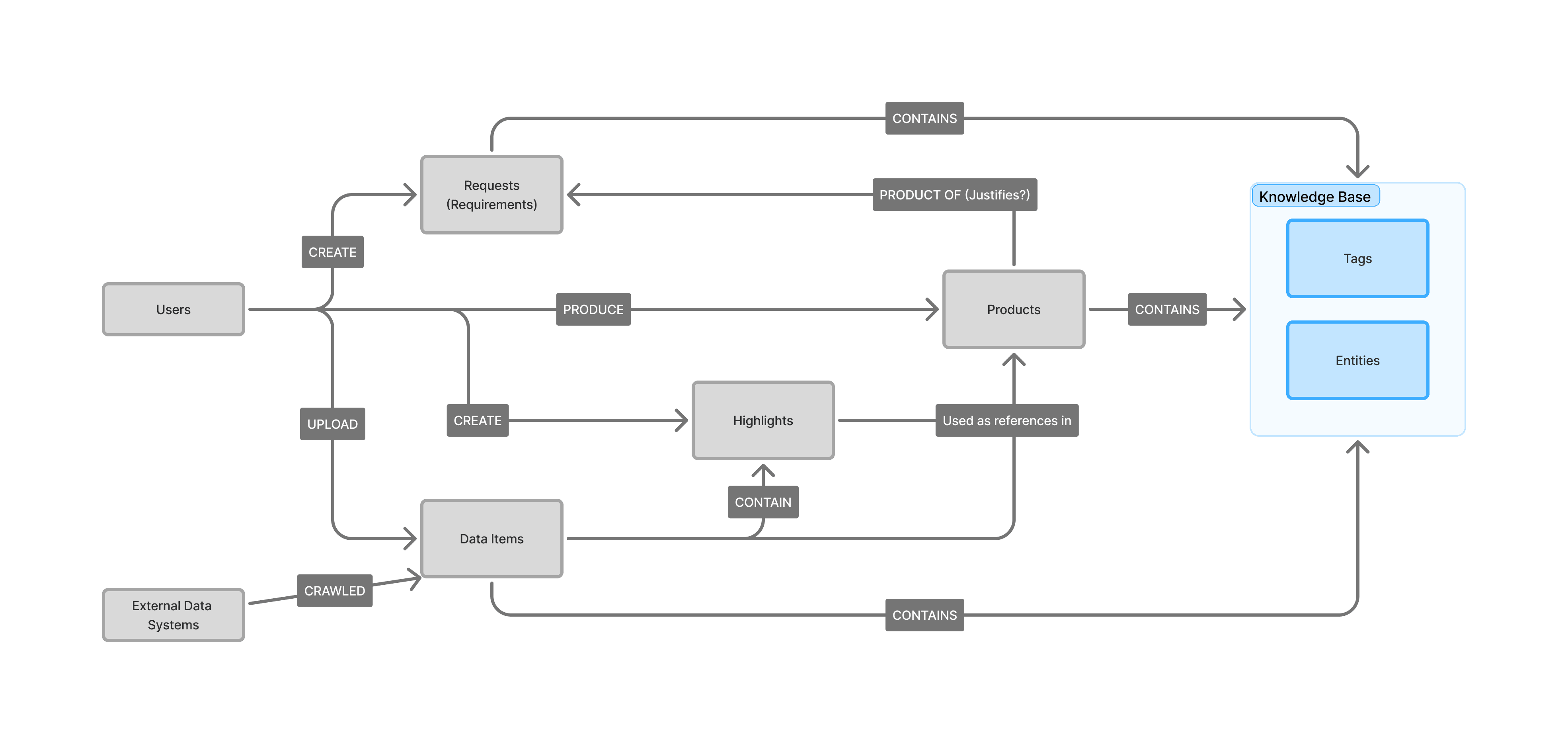
Core Intelligence Requirement Entities
Defined the objects that hold a requirement, its evidence, and its review state in one report record.
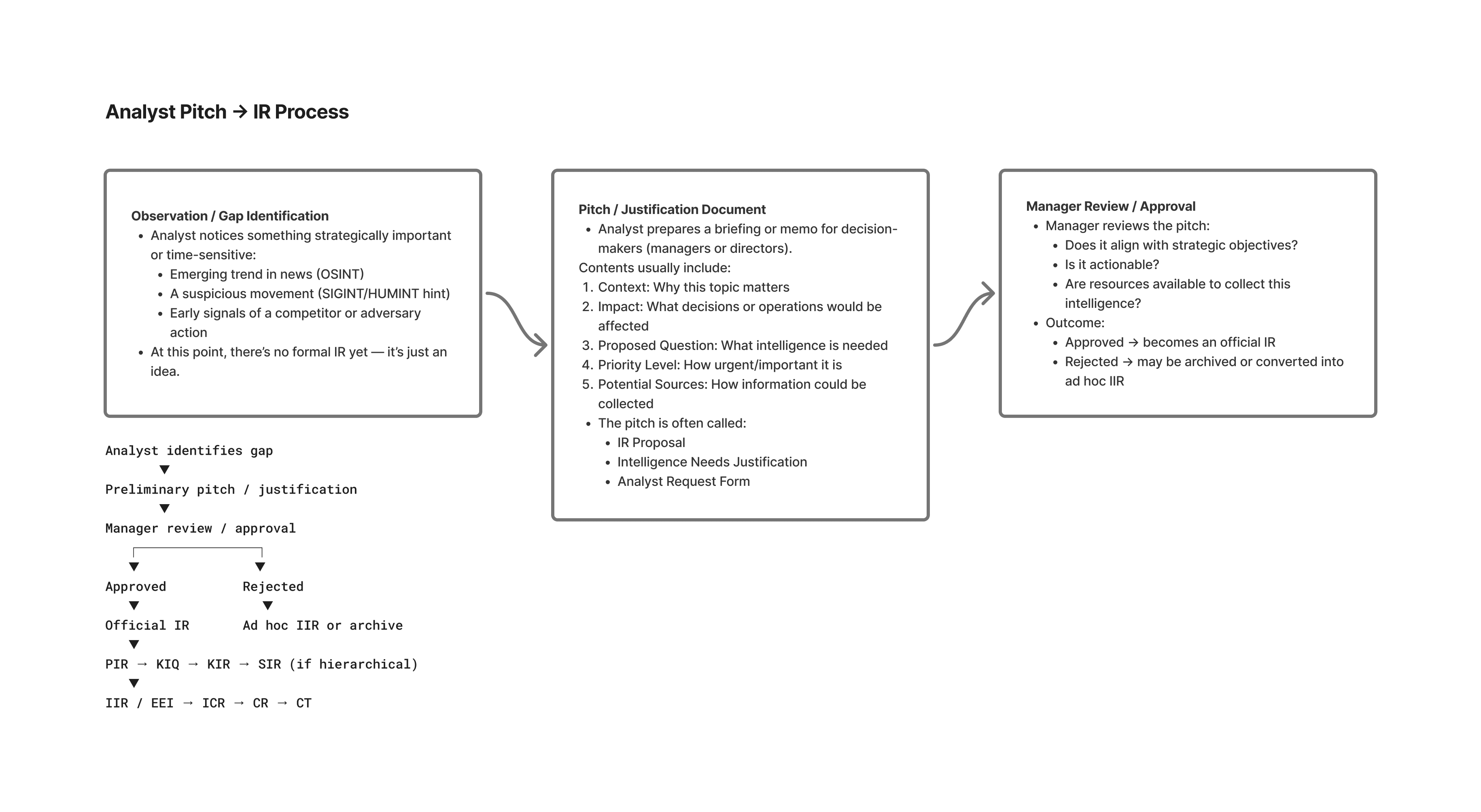
Intelligence Requests Justification
Mapped how an uncovered requirement becomes a justified collection request without losing the original question.
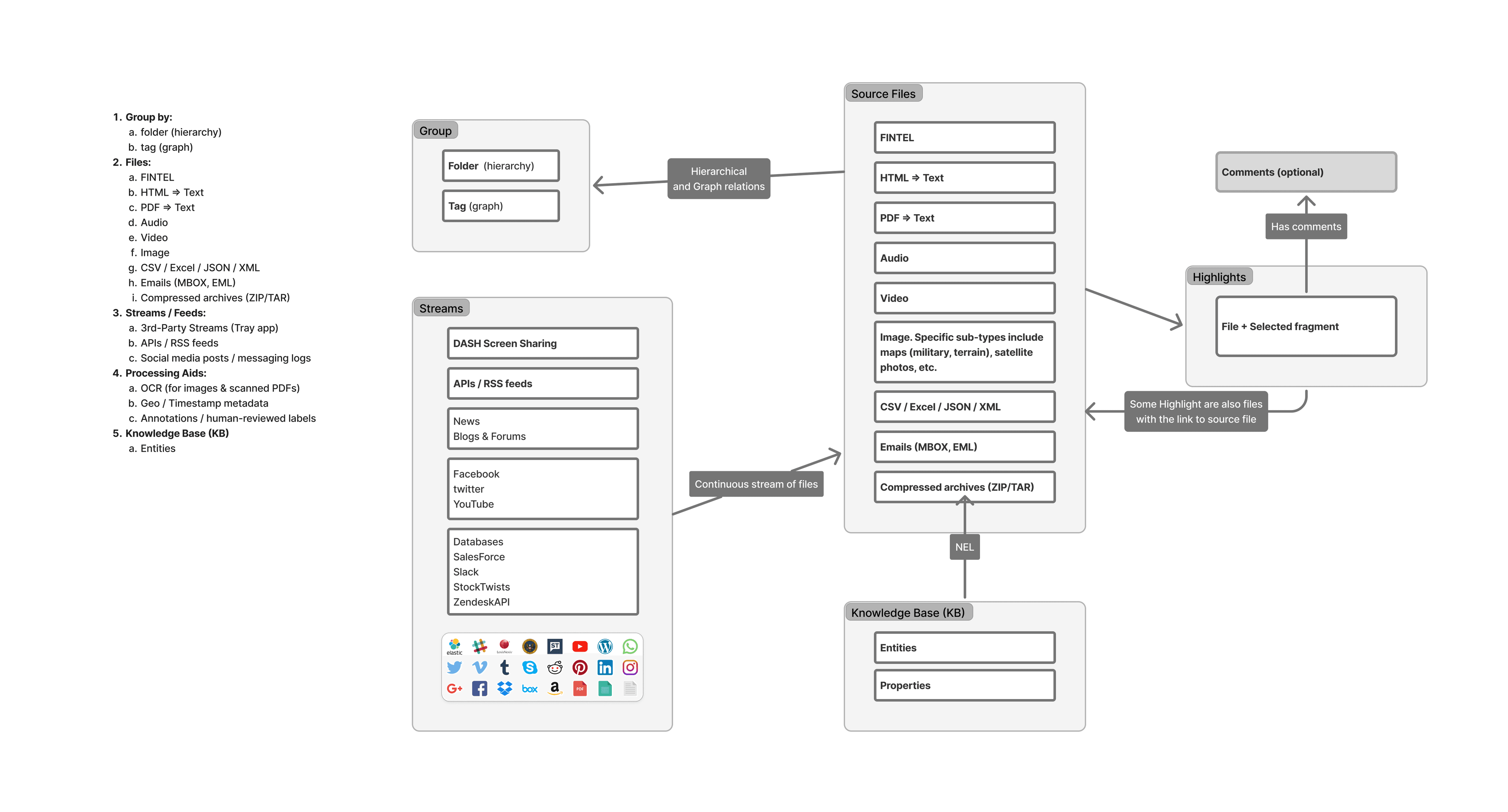
Data items
Separated the data shapes the product needed so handoffs could share structure instead of files alone.
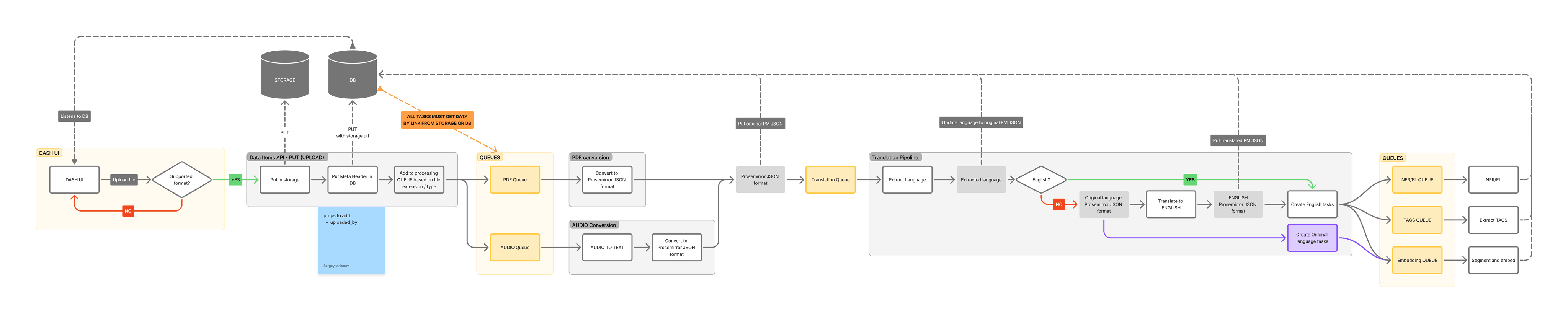
Uploaded files processing
Traced how material enters the on-premises corpus and becomes usable evidence for a report.
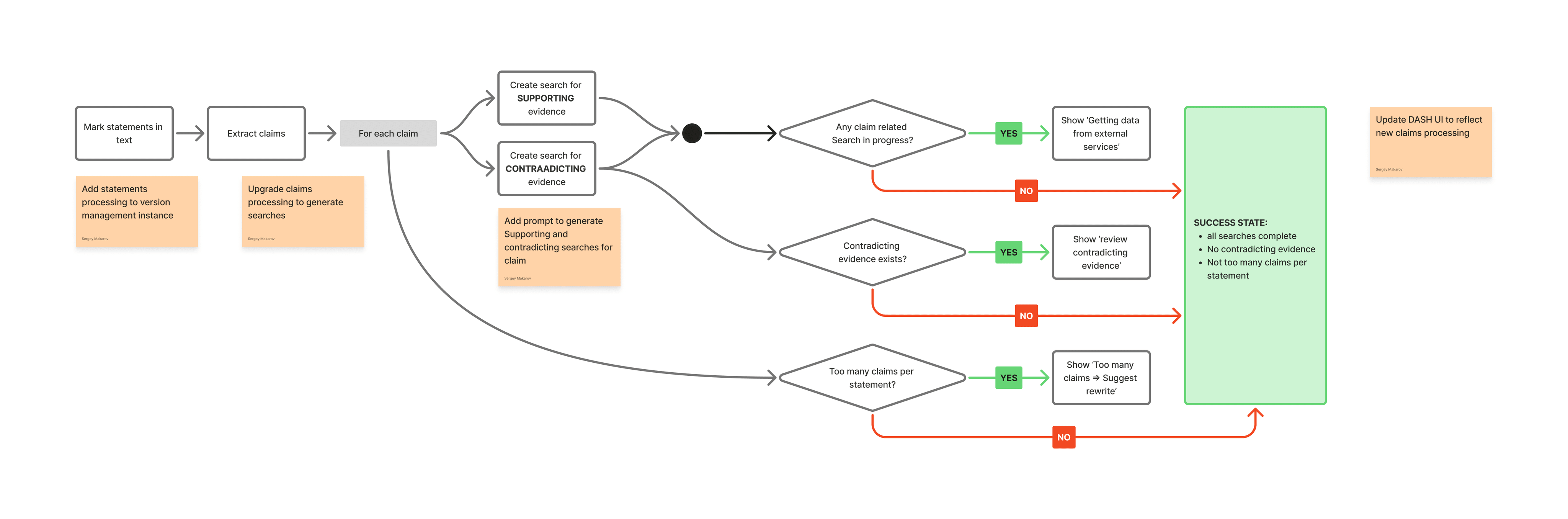
Claim Verification flow
Showed how a claim moves from draft to checked evidence without silent rewriting.
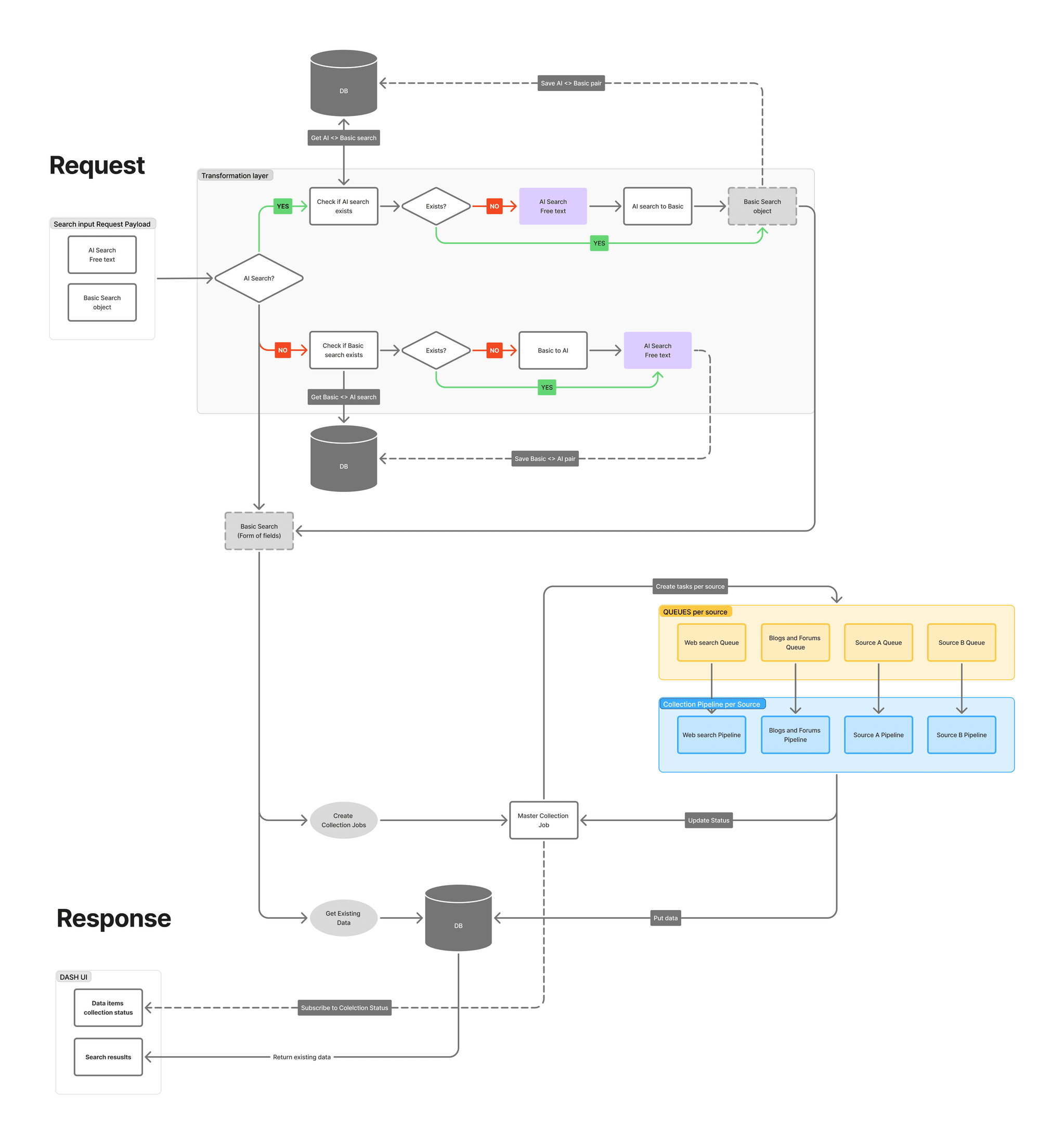
AI / Basic Search
Framed search as a path into the report’s evidence set rather than a separate destination.
App structure for LLM
Located assistance inside the report context so models could propose changes without owning the document.
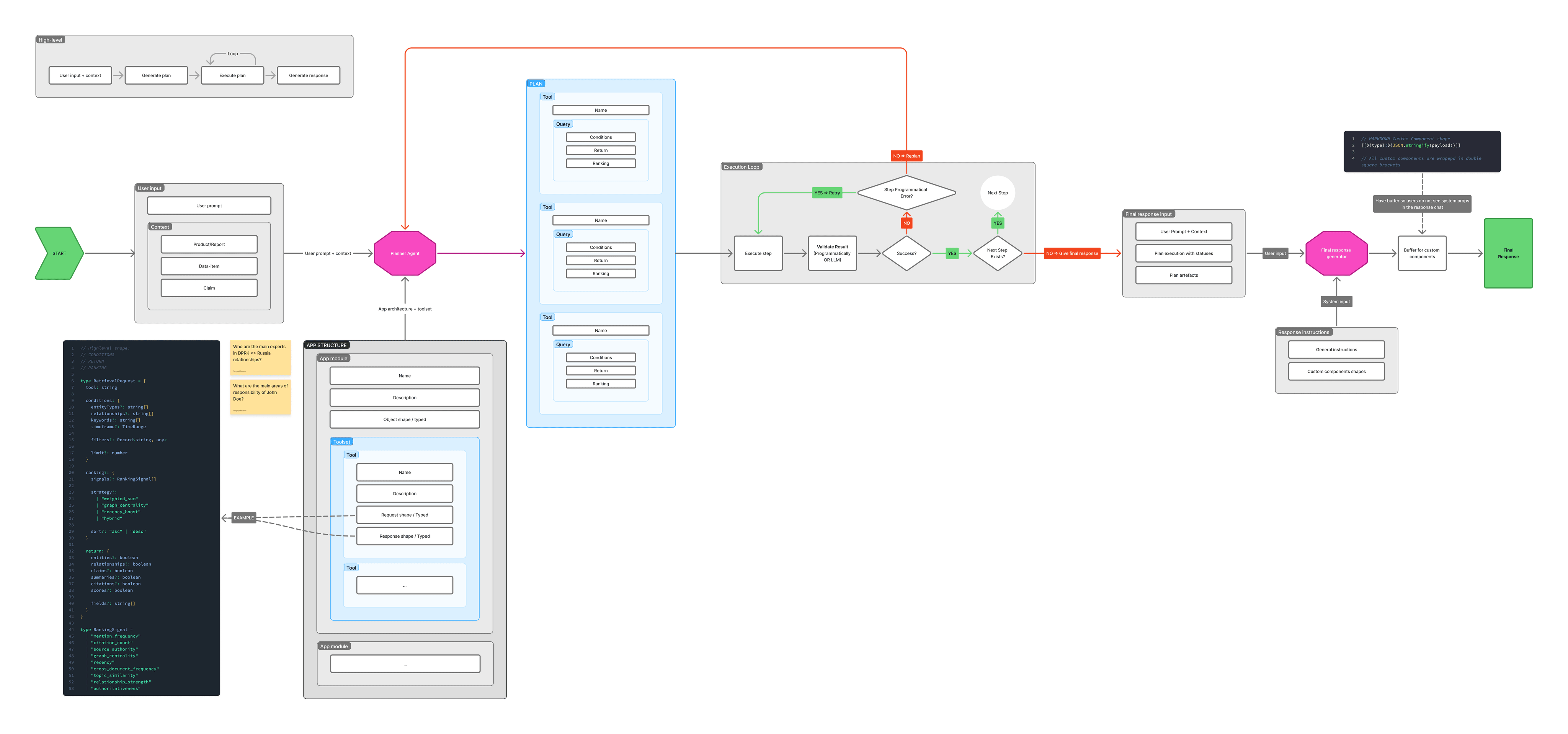
AI assistant execution flow
Specified how a request produces a reversible proposal the analyst can accept, reject, or retry.


The operating model
Joint Publication 2-0 describes intelligence as an overlapping cycle rather than a production line. I used that model to connect planning, collection, analysis, dissemination, and feedback around one report instead of optimizing an isolated screen.
Mission
The mission is set in operational planning and is what the whole intelligence process is organized around. Steps run together, and one can be skipped when it is not needed.
- An imagery request can use stored imagery, not new collection
- Reports reach the commander before analysis
- The same information still goes to the analyst for assessment
- Plans change as requirements are met or appear
- New requirements are prioritized in stride
- A step can be skipped when the mission does not need it, and the rest of the process still runs
Direction: make the report the system of record
The product could have centered on chat, search, or document storage. I centered it on the report because that was where requirements, evidence, analysis, and reviewer judgment needed to converge. The Word add-in carried that model into the analyst’s existing point of work.
1. Expose the gap
- Coverage analysis separates supported and unsupported parts of the requirement.
- An unsupported passage can become a linked collection task without losing the question that exposed it.
2. Bring back evidence
- A collector moves the task from creation through completion, with material required before it can be marked done.
- In Word, the analyst can find the returned source, select the supporting passage, and cite it at the cursor.
3. Test the claim
- Coverage and analytic-standards checks flag weaknesses without silently rewriting the report.
- When a citation is too highly classified for distribution, the analyst can find a lower-classification alternative while preserving the original reasoning.
4. Preserve judgment
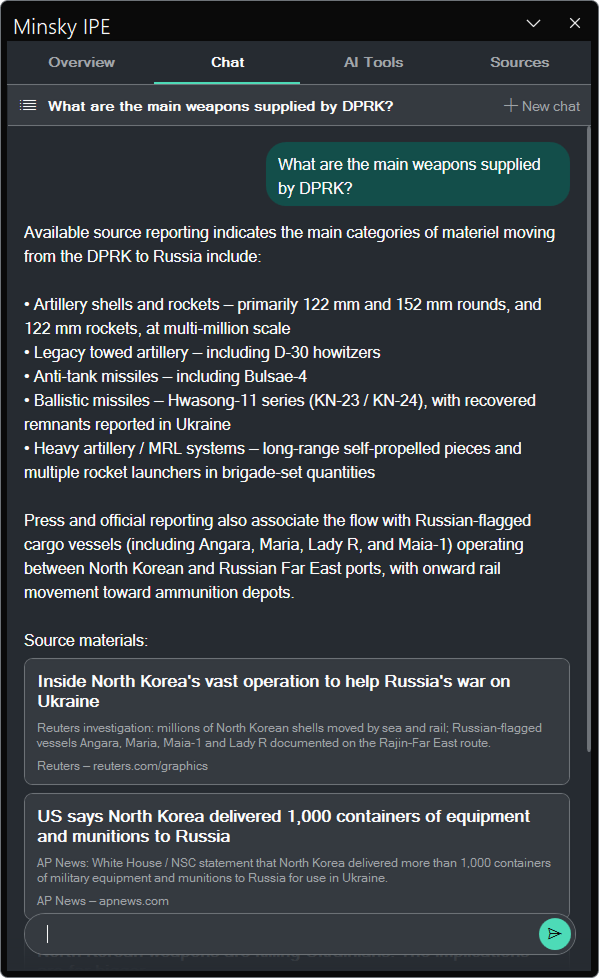
- Generated text arrives as a visible suggestion that the analyst can accept, reject, or retry.
- Submission, recall, approval, and rejection preserve the report state and the reviewer’s decision.
The Word add-in
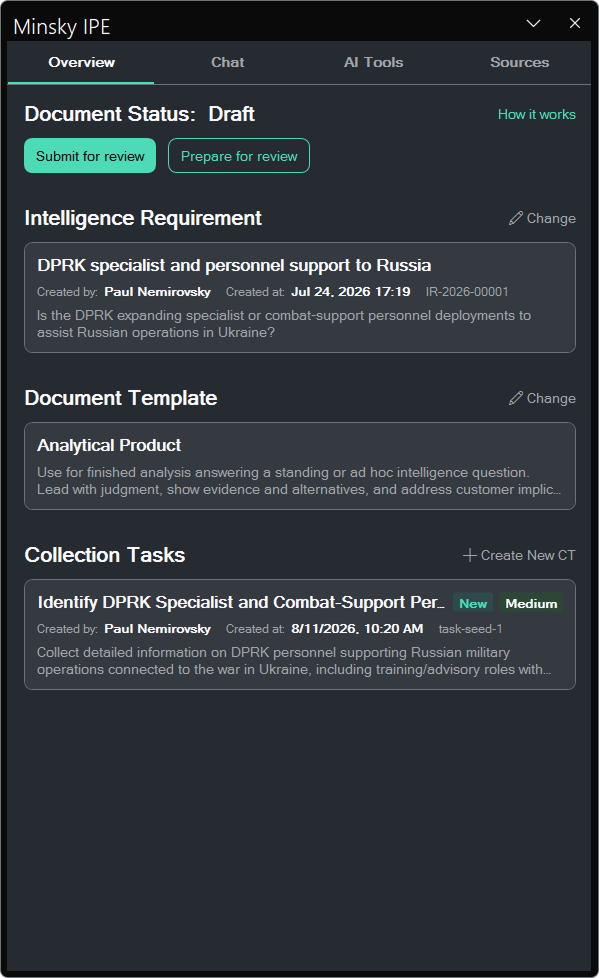
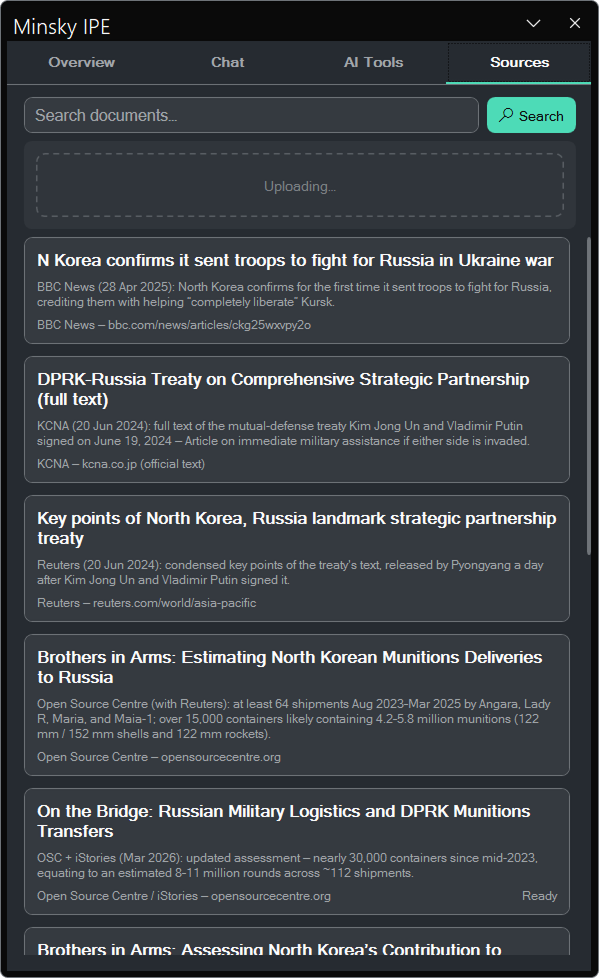
This is the surface I can show. The analyst keeps the official document in Word while the add-in connects it to the requirement, evidence, analytic checks, and review trail.
15
Start with the requirement, not chat
Problem: an empty chat hides why the report exists. Decision: open on the requirement, report status, and source set so assistance begins with the question and its evidence.
- Attach the requirement before drafting
- See evidence gaps and linked collection tasks
- Track the report from draft through approval
Delivered and reviewed
The working system connected requirements, collection tasks, sources, citations, analytic checks, and approval state through one report record. The Word add-in demonstrated that direction in a reviewable interface, while stakeholder and technical review tested it against workflow, security, and on-premises constraints.
Working integration
- The Word add-in connected the active document to requirements, collection tasks, sources, citations, analytic checks, and review state.
- Generated changes used visible, reversible Word interactions rather than silent document edits.
Workflow and constraint review
- Stakeholder review checked the workflow model against perspectives from across the intelligence process.
- The add-in was reviewed against the platform’s on-premises and security constraints.
Limits of the evidence
- The public case study cannot establish analyst adoption, time saved, or decision quality.
- Those outcomes require observation and measurement with users in the operating environment.
Reflection
The project reinforced that high-stakes AI design starts with accountability and evidence, not with a chat box.
What worked
- Treating the report as the shared record gave collection, analysis, citation, and review a common frame.
- Entering through Word respected the established point of work instead of asking analysts to migrate their writing.
What remained uncertain
- Indirect research could expose workflow structure, but not the daily friction, language, or workarounds that direct observation would reveal.
- Review against the security constraints established feasibility, not usability or operational effectiveness.
What I would measure next
- Whether analysts can trace a claim to its requirement and supporting passage without leaving the report.
- Time to resolve an evidence gap, acceptance and rejection rates for generated proposals, citation errors, and review rework.